AI systems
How to run agentic QA
A passing test suite tells you the tests passed. It doesn't tell you whether the product works.
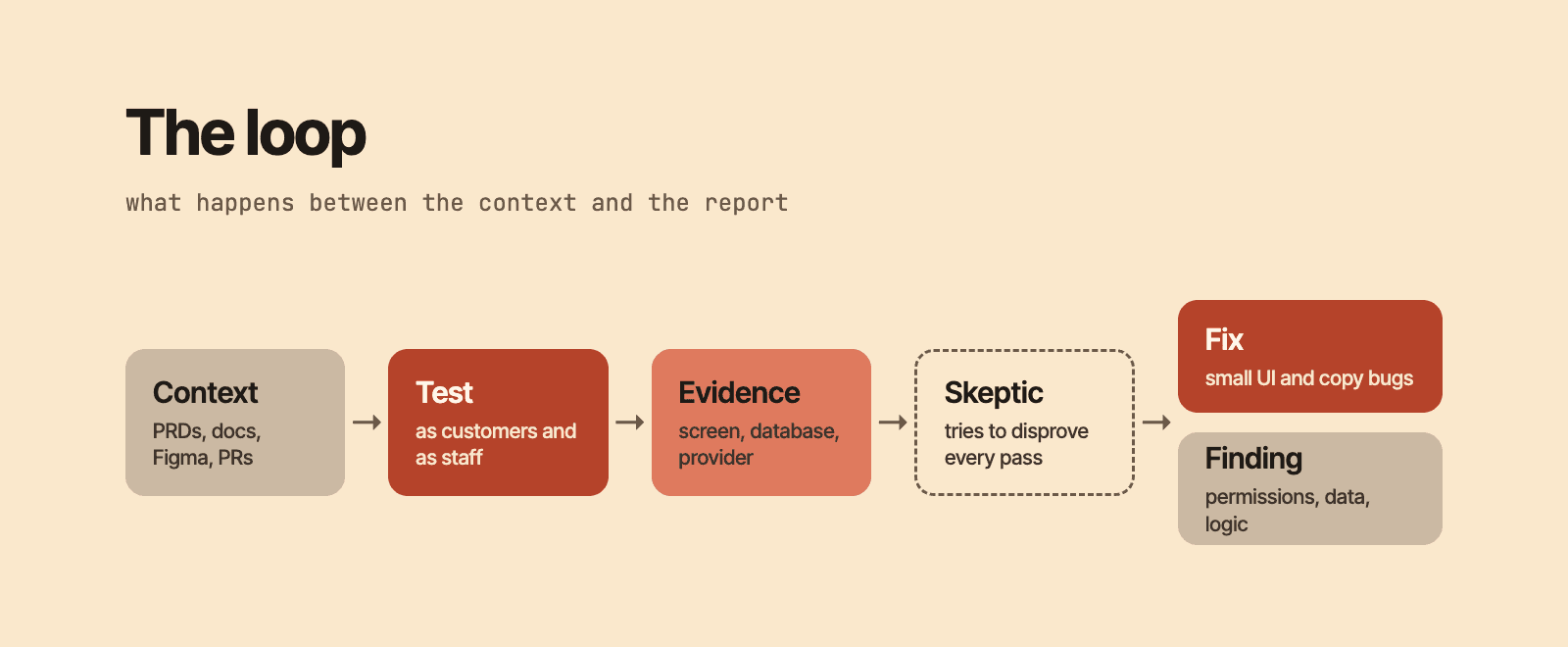
Agentic QA closes that gap. Agents use your app the way customers and staff do, then check the database and your providers to confirm that what the screen showed actually happened. Every result in their report comes with a log, a screenshot or a query.
This guide walks through the setup in order. The full prompt is at the end.
Why agents
A scripted test only checks what someone wrote down in advance.
A person testing by hand sees the whole screen, but won't query the database after every tap.
An agent can do both. It uses the app the way a person would, then reads the records to see what actually happened. If the screen says a payment went through, the agent checks that the database and the provider recorded it too.
Give it context
An agent can only judge what's correct if it knows what you meant to build. Without that, it checks that pages load and buttons respond, and calls that a pass.
Give it the same material you'd give a new QA hire. PRDs say what each feature should do. Docs list the rules the product promises. Figma shows how each screen should look. Recent PRs say what changed and what each change was meant to fix. With those, a mismatch between the plan and the running app becomes a finding, even when nothing crashes.
Use the real stack and block production
Mocks return whatever you told them to, so they can't show you how the real services behave. Run your real stack against the sandbox versions of the services it calls, such as login, email and payments.
Block production through access, not through the prompt. Keep production credentials off the machine the agents run on, and give that machine no network route to production. Agents can ignore an instruction in a prompt. They can't use credentials they don't have.
Have this ready before the first run:
- A test environment the agents can use freely.
- Sandbox keys for every provider.
- Read access to the test database.
- A seeded account for each staff role.
- A branch the agents can push fixes to.
- A separate machine to run on, so your own stays free.
Test as customers and as staff
Have agents sign up as realistic users, log out and back in, and use the product with each other.
Then have them sign in as staff and use the back office the way an ops team would. Admin tools carry as much risk as the customer-facing app, and they get tested far less.
Ask for the cases that are hard to set up by hand: two people changing the same record, a retry after a timeout, a session that expires halfway through a form.
Define what counts as a pass
Agents tend to report success. Write down what a pass has to show:
- A screen that loaded doesn't count as a pass.
- A pass on zero rows proves nothing. Say how many rows you compared.
- Keep evidence for every result.
- A flaky failure is a finding.
Have a second agent check the evidence
Give the evidence to a second agent that didn't run the tests. Its job is to find passes the evidence doesn't support, such as a check marked as passed when the command behind it failed.
Have it check clean results too. A security test that hit a rate limit before it tried anything is unproven, not passed.
Trace every failure to a cause
Failures from load and fault injection tests often look serious and turn out to be bugs in the tests themselves.
Don't let agents dismiss a failure or treat it as an emergency before they know the cause. Make them trace each one and label it as a real bug, a test defect or unproven. Don't accept "it's probably flaky" as a label.
Decide what agents may fix
Agents will make a lot of decisions without you. Have them write down each one with the reason and the evidence, so you can review it in the report.
Let them fix small UI and copy bugs on a branch, each with a test that fails without the fix. Anything that touches permissions, data or core logic should come back to you as a finding.
Ask for a list of product questions only you can answer, such as which of two conflicting values should win, or whether an action should require a typed reason. That list is often as useful as the fixes.
Set limits before you start
- Tag everything the run creates, and only let cleanup delete what carries the tag.
- Make setup check whether a record exists before creating it, so reruns don't duplicate data.
- Put a timeout on every wait.
- Put a lock on heavy work, and cap how many agents build at the same time.
- Have agents write progress to disk, so a run can resume after the machine goes offline.
- Set a budget, and stop opening fixes before it runs out, so every fix gets verified.
Read what wasn't tested first
Make every report end with a section called "What you did not test", and read it first. It tells you which flows, devices and scheduled jobs still need a person or another run.
How I use it
I don't save this for release day. I run it continuously so I know the system still works after every change.
Each run uses a set of personas: customers at different stages, each staff role in the back office, and a DevOps engineer who looks at deploys, logs and scheduled jobs. Each one tests the product from the side they'd actually see.
The agents cross-reference what they find with the PRs that touched that area and the Figma designs for the screen. A finding points at the change that likely caused it and at what the screen was supposed to look like, which makes it quick to act on.
The prompt
Swap the brackets and point it at your test environment. It works with any agent that can drive a browser, run a shell and query a database.
You are the QA team for this app. Test it the way its customers and staff use it.

Setup
- Use only the test environment at [URL]. You have no production access. Don't look for any.
- Use provider sandboxes: [login, email, payments, other services you depend on].
- Read these first: [PRDs, docs, Figma files, recent PRs]. List every rule the product promises and how each screen should look.
- Tag everything you create with [run tag]. Only delete what carries that tag.

Test
- Create realistic users for every customer role. Take each through every journey, from sign-up to closing the account.
- Do the same for every staff role. Use every button, filter and export.
- Test as a DevOps engineer too: deploys, logs and scheduled jobs.
- After each action, compare the screen with the database and with what the provider recorded.
- Try failures: wrong input, double taps, retries, expired sessions, lost connections, and two people changing one record.
- Run the scheduled jobs and check what they wrote.
- Compare every screen with its Figma design.

Evidence
- Only what you asserted counts. A screen that loaded is not a pass.
- A pass on zero rows proves nothing. State how many rows you compared.
- Save a screenshot, log or query result for every result.
- A flaky failure is a finding.
- Trace every failure to a verdict: real bug, test defect or unproven.
- Link each finding to the PR that most likely caused it.
- Give the evidence to a second agent that did not run the tests, and have it try to disprove every pass.

Fixes
- Fix small UI and copy bugs on a branch, each with a test that fails without the fix.
- Do not change core business logic, permissions or data migrations. Report them with the file, line and steps to reproduce.
- Write down every call you make, with the reason and the evidence.

Limits
- Put a timeout on every wait.
- Run heavy builds one at a time.
- Stop opening fixes when [budget] is nearly spent, and say what's left.

Report
- Results table: what you tested, how, what you compared, and the result.
- Findings by severity, with steps to reproduce.
- Decisions I need to make.
- UX improvements, ranked.
- What you did not test, and why.
- Test data you left behind.